
Last Updated: October 31, 2026
Keeping track of your working hours with our work hours calculator is important whether you are a full-time employee, part-time worker, freelancer, or business owner. Knowing exactly how much time you spend working can help you review your schedule, organize your week, and understand the number of hours you have completed during a pay period.
Our free Work Hours Calculator makes this process easier. Enter your starting time, ending time, and unpaid break duration for each day. The calculator automatically estimates your daily working hours, total weekly hours, regular hours, and potential overtime hours.

You do not need to calculate the time manually with our work hours calculator or convert every minute into decimal hours. Simply enter your work schedule and let the calculator do the math.
Work Hours Calculator
Calculate your daily and weekly working hours, subtract unpaid breaks, and estimate regular and overtime hours automatically.
Enter Your Daily Work Schedule
| Day | Start Time | End Time | Unpaid Break (min) | Daily Hours |
|---|---|---|---|---|
| Monday | 0.00 hrs | |||
| Tuesday | 0.00 hrs | |||
| Wednesday | 0.00 hrs | |||
| Thursday | 0.00 hrs | |||
| Friday | 0.00 hrs | |||
| Saturday | 0.00 hrs | |||
| Sunday | 0.00 hrs |
Weekly Calculation Settings
Your Work Hours Results
What Is a Work Hours Calculator?
A work hours calculator is an online tool that determines how much time someone has worked during a specific day or week. It uses the employee’s starting and ending times and subtracts any unpaid break time entered by the user.
For example, if you start work at 9:00 AM and finish at 5:00 PM, your total time between the two entries is eight hours. If you take a 30-minute unpaid meal break, your estimated working time becomes 7.5 hours.

This type of work hours calculator is useful for employees who want to check their schedules, freelancers who track billable time, and small businesses that organize employee timesheets.
How to Use the Work Hours Calculator
Using this calculator is simple. Follow these steps to estimate your working hours:
- Enter your start time: Choose the time you began working on a particular day.
- Enter your end time: Select the time you finished your shift.
- Add unpaid break minutes: Enter the number of minutes you were completely relieved from work and that should be excluded from your working time.
- Repeat for other days: Add the working times for each day of the week.
- Review your results: The calculator automatically displays daily hours and your weekly totals.
- Check regular and overtime hours: Review the regular-hours threshold and the estimated hours above that threshold.
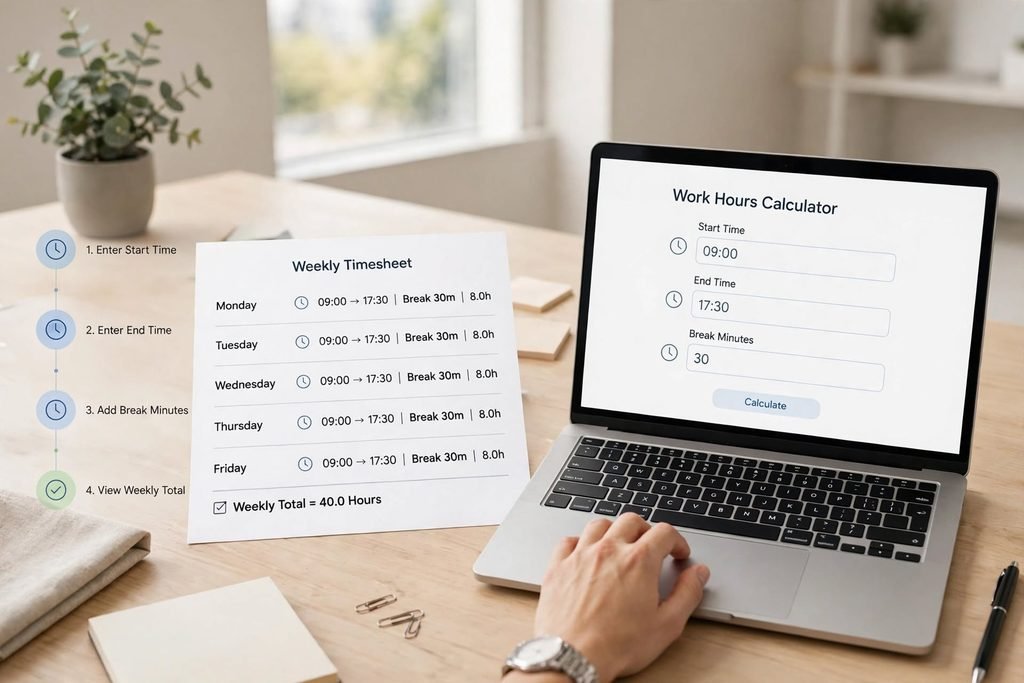
You can leave days blank if you did not work on those days. The calculator will ignore empty days when adding the weekly total.
How Are Work Hours Calculated?
The basic formula is:
Total Work Hours = End Time − Start Time − Unpaid Break Time
For example, imagine that an employee works from 8:30 AM until 5:00 PM and takes a 30-minute unpaid break.
- Starting time: 8:30 AM
- Ending time: 5:00 PM
- Total time between entries: 8.5 hours
- Unpaid break: 0.5 hours
- Actual calculated work time: 8 hours
The result is eight working hours.
The calculator converts minutes into decimal hours automatically. For example, 15 minutes equals 0.25 hours, 30 minutes equals 0.50 hours, and 45 minutes equals 0.75 hours.
Understanding Daily and Weekly Work Hours
Daily work hours show the amount of time worked during an individual shift. Weekly work hours represent the combined working time across the days entered in the calculator.
For example, someone who works eight hours per day for five days has a total of 40 working hours for that week.
However, schedules are not always identical. Some employees work different shifts, change their schedules, or work on weekends. Recording each day’s actual start and end times can provide a more useful weekly estimate than simply multiplying a standard daily schedule.

If your schedule changes regularly, enter the actual hours worked rather than relying on your usual timetable.
Paid Breaks vs. Unpaid Breaks
Breaks can affect the number of hours included in a work-hours calculation. It is important to distinguish between paid working time and unpaid meal periods.
Under general federal Fair Labor Standards Act guidance, short rest breaks, commonly lasting about 5 to 20 minutes, are generally counted as working time when provided by an employer. Bona fide meal periods, often 30 minutes or longer, may generally be excluded when the employee is completely relieved of duties during the meal period.

If you must continue working, answer calls, monitor equipment, or perform other job duties during a meal period, that time may need to be treated differently. State laws may also provide additional break requirements.
For this reason, enter only break time that should actually be excluded from your working hours. Do not automatically subtract a meal break if you were required to continue working.
For official guidance, see the U.S. Department of Labor’s Hours Worked Fact Sheet and its information about Breaks and Meal Periods.
What Are Regular Hours and Overtime Hours?
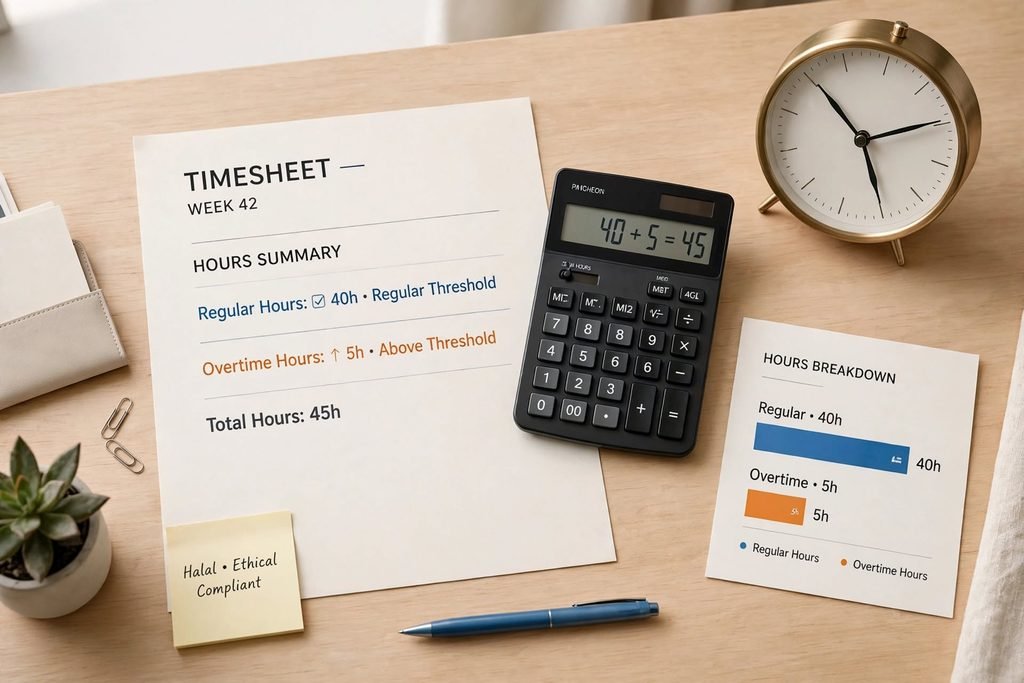
Regular hours are the hours counted within the applicable regular-hours threshold. Overtime hours are hours above that threshold when overtime rules apply.
For many employees covered by federal overtime provisions who are classified as nonexempt, the FLSA generally requires overtime pay after 40 hours worked in a workweek. The federal overtime rate is generally at least one and one-half times the employee’s regular rate for qualifying overtime hours.
However, overtime eligibility depends on the employee’s classification and applicable rules. Some employees may be exempt, and certain occupations have special provisions. State laws may also provide additional protections.
Our calculator uses a default weekly threshold of 40 hours to show a simple estimate of hours above that number. You can change the threshold if you need a different planning figure. The result is not a legal determination of overtime eligibility and does not calculate overtime wages.
To learn more, visit the Department of Labor’s Overtime Pay Fact Sheet.
Example: Calculating a 40-Hour Workweek
Suppose an employee works from 9:00 AM to 5:30 PM, Monday through Friday, and takes a 30-minute unpaid meal break each day.
The daily calculation is:
- Total time between start and end: 8.5 hours
- Unpaid break: 0.5 hours
- Working time per day: 8 hours
The weekly calculation is:
- Monday: 8 hours
- Tuesday: 8 hours
- Wednesday: 8 hours
- Thursday: 8 hours
- Friday: 8 hours
- Total: 40 hours
In this example, the employee has 40 calculated working hours for the week. Whether any overtime is owed depends on the employee’s coverage, classification, and applicable employment rules.
How to Calculate an Overnight Shift
Some employees work shifts that continue past midnight. For example, a worker may start at 10:00 PM and finish at 6:00 AM the following day.
The time difference is eight hours. If the employee takes a 30-minute unpaid break, the estimated working time is 7.5 hours.
Our calculator supports overnight shifts by treating an end time earlier than the start time as occurring on the following day. Always check that the times you enter represent the actual shift.
Why Tracking Your Work Hours Matters
Keeping accurate work-hour records can help you in several ways:
- Review your schedule: Understand how much time you spend working each day and week.
- Check your timesheet: Compare your own records with the hours shown on your employer’s timesheet.
- Organize your income planning: Use your working hours with an hourly wage estimate to understand your gross earnings.
- Manage your workload: Identify weeks when your working time is higher than usual.
- Plan freelance projects: Estimate the time spent on client work and organize your available hours.
- Maintain personal records: Keep a useful record of your working schedule.

The U.S. Department of Labor explains that covered employers must maintain accurate records of hours worked and wages. Its Recordkeeping Fact Sheet explains the general recordkeeping requirements.
Work Hours Calculator vs. Manual Timesheets
A manual timesheet can be useful, but calculating every shift by hand may take time, especially when your schedule changes or includes overnight work.
An online work hours calculator can make the process quicker by automatically subtracting unpaid breaks, converting minutes into decimal hours, and adding daily totals into a weekly result.
However, the calculator should be treated as a planning and checking tool. Keep your original work records and follow your employer’s official timekeeping procedures.

Final Thoughts
Tracking your working hours does not have to be complicated. With our free Work Hours Calculator, you can estimate daily and weekly working time, account for unpaid breaks, and review hours above a chosen weekly threshold.
Whether you work a regular schedule, variable shifts, overnight hours, or freelance projects, accurate time records can help you organize your work and understand your schedule more clearly.
Use the calculator above whenever you need a quick estimate, and remember to check your employer’s policies and applicable labor rules for official timekeeping and overtime decisions.
Frequently Asked Questions
Subtract your starting time from your ending time, then subtract any unpaid break time that should be excluded. Add the results for each working day to calculate your weekly total.
A 40-hour workweek commonly consists of eight working hours per day over five days. Actual schedules can vary by employer and occupation.
Yes. Enter the number of unpaid break minutes for each day. The calculator subtracts the entered amount from the time between your start and end entries.
Generally, no. Short rest breaks that count as paid working time should not be entered as unpaid breaks. Check the rules that apply to your workplace.
Yes. Enter the starting time and the ending time. If the ending time is earlier than the starting time, the calculator treats it as the following day.
For a simple estimate, subtract the weekly regular-hours threshold from total weekly hours when the total is higher than that threshold. Actual overtime eligibility depends on applicable employment rules.
Forty hours is a common full-time schedule, but there is no single definition that applies to every employer and benefit program. Employers and programs may use different standards.
Yes. Freelancers can enter their daily working times to estimate the hours spent on projects, client tasks, and other professional activities.
No. It calculates working hours, not take-home pay. You can use the Hourly to Salary Calculator to convert an hourly wage into estimated gross income.
No. It is a general calculation tool. Follow your employer’s timekeeping procedures and retain accurate records of the hours you actually work.